# Accessing WCF Service via Azure Service Bus Relay with .NET Core

> Calling an on-premises WCF service from a .NET Core web app through Azure Service Bus Relay by crafting the SOAP request and relay token by hand.

Published: 2018-11-28
Tags: .net-core, servicebus-relay, soap, wcf
Canonical: https://sanjaybhagia.com/blog/accessing-wcf-service-via-azure-service-bus-relay-with-net-core/

<!-- wp:paragraph {"ampFitText":true} -->
<amp-fit-text layout="fixed-height" min-font-size="14" max-font-size="48" height="50"><p><em><a href="https://github.com/sanjaybhagia/wcfservice-servicebusrelay-netcore" target="_blank" rel="noreferrer noopener" aria-label="Check out my GitHub repository if you want to dig into the source code directly. (opens in a new tab)">Check out my GitHub repository if you want to dig into the source code directly.</a></em></p></amp-fit-text>
<!-- /wp:paragraph -->

<!-- wp:paragraph -->
<p>WCF (Windows Communication Foundation) has served us for a long time when it comes to talking to many LOB systems (SAP etc.). You might have love or hate (<em>though&nbsp;if I have to guess, it would be on hate side</em>) relationship with WCF but it works and at times we don't have any other choice. If you happen to be in a situation where you are talking to legacy systems via WCF, you most likely have a built an API layer on top of it to serve your clients. </p>
<!-- /wp:paragraph -->

<!-- wp:paragraph -->
<p>I was recently looking to consume WCF services using .NET Core <em>(with the intention that I can migrate my web application to .NET Core)</em>. Very quickly I came up to this <a href="https://github.com/dotnet/wcf" target="_blank" rel="noopener">GitHub&nbsp;repository</a> which was awesome. However, this .NET&nbsp;Core implementation is not in parity with the full framework yet.&nbsp; I tested it and it worked just fine with standard bindings (<g class="gr_ gr_7 gr-alert gr_spell gr_inline_cards gr_run_anim ContextualSpelling ins-del multiReplace" id="7" data-gr-id="7">http</g>&nbsp;etc). <a href="https://twitter.com/spboyer" target="_blank" rel="noopener">Shane Boyer</a> has a good <a href="http://tattoocoder.com/asp-net-core-getting-clean-with-soap/" target="_blank" rel="noopener">blog post</a> on this topic if you want to see how to use this.</p>
<!-- /wp:paragraph -->

<!-- wp:paragraph -->
<p>As far as my needs (this particular scenario) are concerned, I couldn't get it to work for my setup.&nbsp;This is how the setup looks for me.&nbsp;</p>
<!-- /wp:paragraph -->

<!-- wp:paragraph -->
<p>The web application (hosted in Azure Web App) talks to WCF Service (running on-premises, hosted in IIS) via Azure Service Bus Relay (in Azure)</p>
<!-- /wp:paragraph -->

<!-- wp:image {"id":673} -->
<figure class="wp-block-image"><img src="/images/image-21.png" alt="" class="wp-image-673"/></figure>
<!-- /wp:image -->

<!-- wp:paragraph -->
<p>So basically, there is no equivalent to basicHttpRelayBinding <g class="gr_ gr_33 gr-alert gr_gramm gr_inline_cards gr_run_anim Style multiReplace" id="33" data-gr-id="33">in .</g>NET Core implementation yet and this is something my WCF service has to enable communication via Azure Service Bus Relay.&nbsp;</p>
<!-- /wp:paragraph -->

<!-- wp:paragraph -->
<p>After discussing with a friend of mine, I got a suggestion to try it out with SOAP instead and it seems to work fine! I know it sounds a bit ironic that on the one hand I'm moving to the latest (and greatest) framework for my web application but at the same time, I'm going one step back and using SOAP protocol to make it work - well such is life. I would very much appreciate if anyone can point me to the better solution. but until then, let's continue forward.</p>
<!-- /wp:paragraph -->

<!-- wp:paragraph -->
<p>So, in this blog post<g class="gr_ gr_182 gr-alert sel gr_gramm gr_replaced gr_inline_cards gr_disable_anim_appear Punctuation only-ins replaceWithoutSep" id="182" data-gr-id="182">,</g> I will go through how did I manage to call WCF service from my .NET Core Web Application. Again,&nbsp;<a href="https://github.com/sanjaybhagia/wcfservice-servicebusrelay-netcore" target="_blank" rel="noreferrer noopener">here is the entire source code</a></p>
<!-- /wp:paragraph -->

<!-- wp:paragraph -->
<p><a href="https://github.com/sanjaybhagia/wcfservice-servicebusrelay-netcore" target="_blank" rel="noopener"></a>So this is what <g class="gr_ gr_17 gr-alert sel gr_spell gr_replaced gr_inline_cards gr_disable_anim_appear ContextualSpelling multiReplace" id="17" data-gr-id="17">I'm</g> going to do:&nbsp;</p>
<!-- /wp:paragraph -->

<!-- wp:list -->
<ul><li>Create Azure Service Bus Relay (<a href="https://docs.microsoft.com/en-us/azure/service-bus-relay/service-bus-dotnet-hybrid-app-using-service-bus-relay" target="_blank">read here how to create this</a>)</li><li>Create a WCF Service (with Azure Service Bus Relay Binding) and publish this locally to run it on IIS</li><li>ASP.NET Core Web Application calling to WCF Service using HTTP Post SOAP request.</li></ul>
<!-- /wp:list -->

<!-- wp:paragraph -->
<p>Follow the link I have provided above to create the service bus relay. Let's start with WCF Service. Here is the <a href="https://github.com/sanjaybhagia/wcfservice-servicebusrelay-netcore/tree/master/WcfService" target="_blank">sample WCF <g class="gr_ gr_188 gr-alert gr_gramm gr_inline_cards gr_disable_anim_appear Punctuation only-ins replaceWithoutSep" id="188" data-gr-id="188">project</g></a> I build for this demo.&nbsp; It's a very basic WCF service which has Azure Service Bus Relay binding besides standard HTTP&nbsp;binding (check out the <a href="https://github.com/sanjaybhagia/wcfservice-servicebusrelay-netcore/blob/master/WcfService/WcfService/Web.config" target="_blank">web.config</a> for binding details). I have deployed this in IIS on my local machine. You can clone the repository and add the details of your relay if you want to try it out yourself. It exposes the following contract, which I'm interested in.</p>
<!-- /wp:paragraph -->

<!-- wp:code -->
<pre class="wp-block-code"><code lang="clike" class="language-clike">[ServiceContract]
    public interface ICustomerService
    {
        [OperationContract]
        string GetCustomerData(string customerId);
    }</code></pre>
<!-- /wp:code -->

<!-- wp:paragraph -->
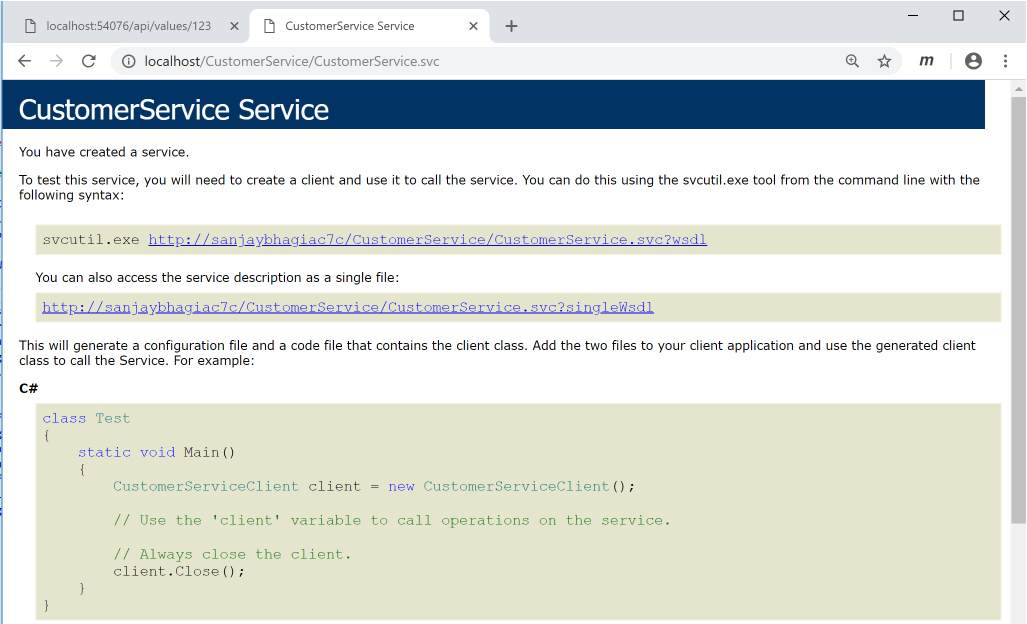
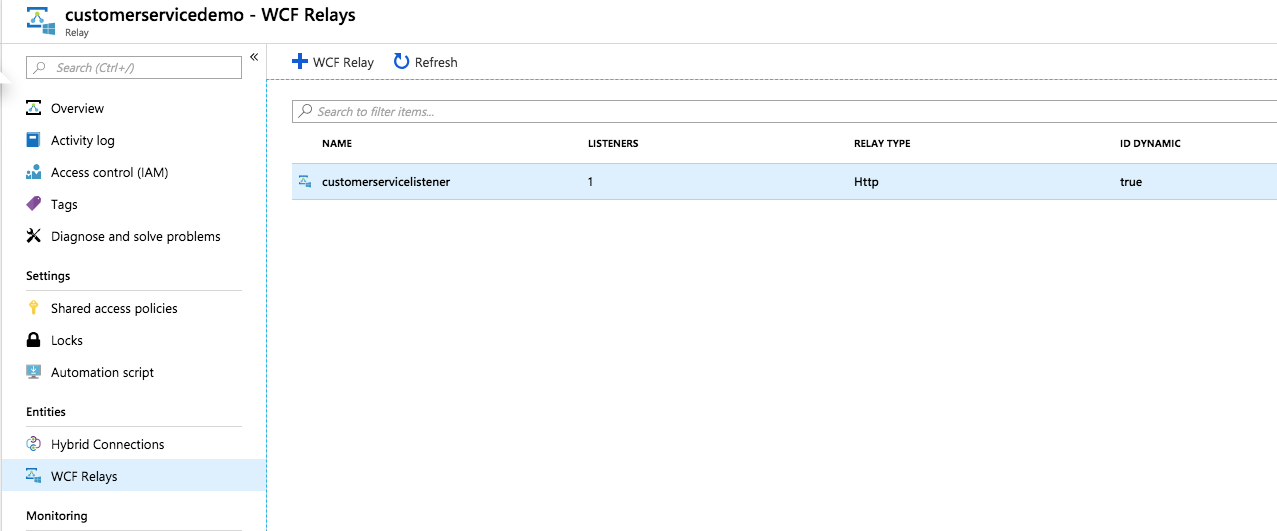
<p>When you&nbsp;browse&nbsp;this service from IIS you should see the service like this. At this point, a Service Bus WCF listener should also be registered in your namespace (you can check it in Azure Portal)</p>
<!-- /wp:paragraph -->

<!-- wp:image {"id":660} -->
<figure class="wp-block-image"><img src="/images/image-14.png" alt="" class="wp-image-660"/><figcaption>WCF Service deployed in IIS with Azure Service Relay Binding</figcaption></figure>
<!-- /wp:image -->

<!-- wp:image {"id":667} -->
<figure class="wp-block-image"><img src="/images/image-18.png" alt="" class="wp-image-667"/><figcaption>WCF Relay Registered from WCF Service</figcaption></figure>
<!-- /wp:image -->

<!-- wp:paragraph -->
<p>Now, let's start with the web application. I have created a vanilla ASP.NET Core Web API project (2.1). You can grab the <a href="https://github.com/sanjaybhagia/wcfservice-servicebusrelay-netcore/tree/master/WebApplication" target="_blank" rel="noopener">source code from here </a>(and clone it if you want to try it out yourself). <em>Make sure you update settings in <g class="gr_ gr_6 gr-alert gr_gramm gr_inline_cards gr_run_anim Grammar only-ins doubleReplace replaceWithoutSep" id="6" data-gr-id="6">appsettings.json</g> file for Azure Service Bus Relay. If you wish you publish this to Azure Web app - add these settings as Application Settings</em></p>
<!-- /wp:paragraph -->

<!-- wp:paragraph -->
<p>After creating the project, I added following NuGet package</p>
<!-- /wp:paragraph -->

<!-- wp:paragraph -->
<p><strong>Nuget Packages:&nbsp;</strong></p>
<!-- /wp:paragraph -->

<!-- wp:list -->
<ul><li>Microsoft.Azure.ServiceBus</li></ul>
<!-- /wp:list -->

<!-- wp:paragraph -->
<p>In <strong>ValuesController</strong>, I have created a <em>GetCustomerData</em> method that takes in <em>customerId</em> as a string.&nbsp; In here, I'll make a call to WCF Service and return the response I receive from the service (<em>the WCF service returns a dummy response</em>)</p>
<!-- /wp:paragraph -->

<!-- wp:code -->
<pre class="wp-block-code"><code lang="clike" class="language-clike">[HttpGet("{customerId}")]
public async Task&lt;string> GetCustomerData(string customerId)</code></pre>
<!-- /wp:code -->

<!-- wp:paragraph -->
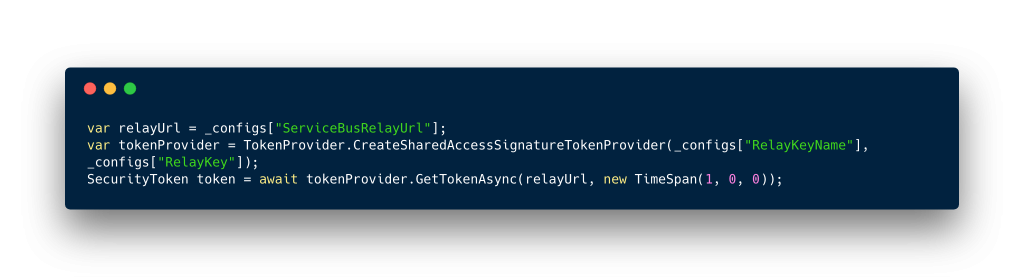
<p>Then moving forwards,&nbsp; I generate the token for Azur Service Bus Relay:</p>
<!-- /wp:paragraph -->

<!-- wp:image {"id":665,"linkDestination":"custom"} -->
<figure class="wp-block-image"><a href="https://github.com/sanjaybhagia/wcfservice-servicebusrelay-netcore/blob/master/WebApplication/WebApplication/Controllers/ValuesController.cs"><img src="/images/image-17.png" alt="" class="wp-image-665"/></a><figcaption>Generating Token for Service Bus Relay</figcaption></figure>
<!-- /wp:image -->

<!-- wp:paragraph -->
<p>With this information, I construct the HTTP Post request like this:</p>
<!-- /wp:paragraph -->

<!-- wp:github-gist-gutenberg-block/github-gist {"url":"https://gist.github.com/sanjaybhagia/569e348e1bdc9fd9a53c95d28cd0e56e"} -->
<?# Gist 569e348e1bdc9fd9a53c95d28cd0e56e /?>
<!-- <a href="https://gist.github.com/sanjaybhagia/569e348e1bdc9fd9a53c95d28cd0e56e" class="wp-block-github-gist-gutenberg-block-github-gist">View Gist on GitHub</a> -->
<!-- /wp:github-gist-gutenberg-block/github-gist -->

<!-- wp:paragraph -->
<p>We are basically making <g class="gr_ gr_49 gr-alert sel gr_gramm gr_replaced gr_inline_cards gr_disable_anim_appear Grammar multiReplace" id="49" data-gr-id="49">an</g> HTTP Post Request to the Service Bus Relay endpoint over SOAP. For this, we need to set up a few headers</p>
<!-- /wp:paragraph -->

<!-- wp:list -->
<ul><li>ServiceBusAuthorization - <em>Relay Token retrieved earlier</em></li><li>SOAPAction - <em>The Operation you want to call from WCF Service</em></li><li>Accept header - <em>text/</em><g class="gr_ gr_117 gr-alert gr_spell gr_inline_cards gr_run_anim ContextualSpelling ins-del multiReplace" id="117" data-gr-id="117">xml</g></li></ul>
<!-- /wp:list -->

<!-- wp:paragraph -->
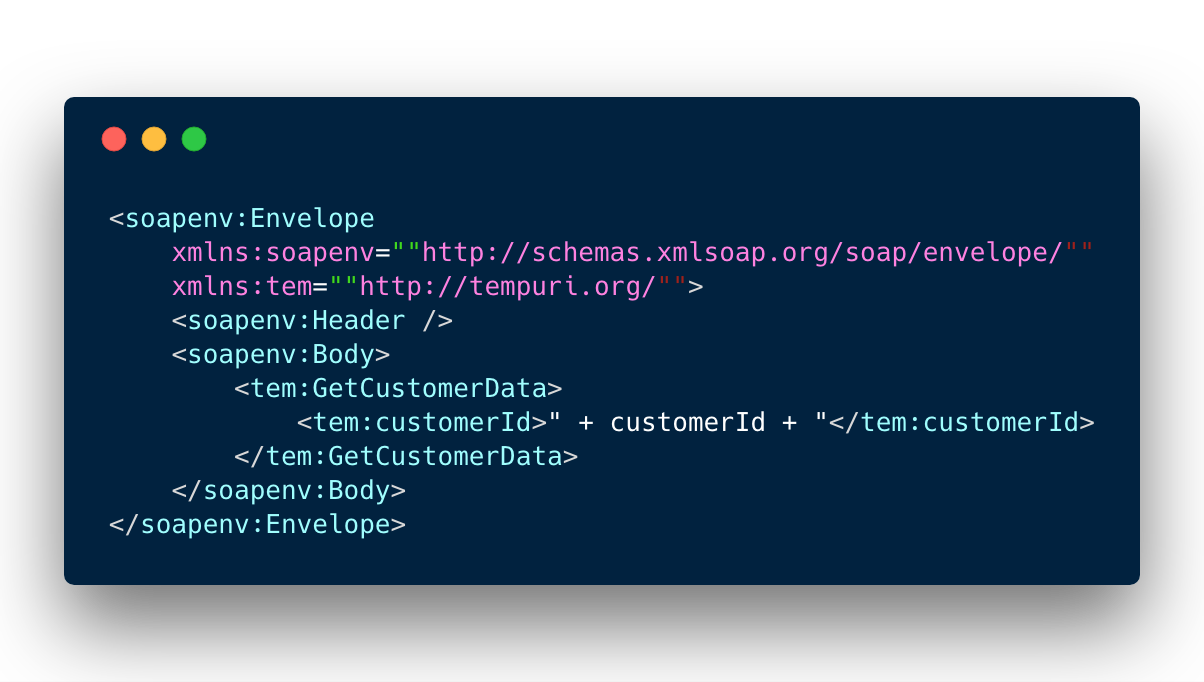
<p>Lastly, we need to set the body for the request - since this is a SOAP call, we need a&nbsp;<g class="gr_ gr_3 gr-alert gr_gramm gr_inline_cards gr_run_anim Grammar only-ins replaceWithoutSep" id="3" data-gr-id="3">SOAP</g> message.</p>
<!-- /wp:paragraph -->

<!-- wp:image {"id":664,"linkDestination":"custom"} -->
<figure class="wp-block-image"><a href="https://github.com/sanjaybhagia/wcfservice-servicebusrelay-netcore/blob/master/WebApplication/WebApplication/Controllers/ValuesController.cs"><img src="/images/image-16.png" alt="" class="wp-image-664"/></a><figcaption>SOAP message body</figcaption></figure>
<!-- /wp:image -->

<!-- wp:paragraph -->
<p>Press F5 and run the web application, pass in <g class="gr_ gr_130 gr-alert gr_spell gr_inline_cards gr_run_anim ContextualSpelling ins-del multiReplace" id="130" data-gr-id="130"><g class="gr_ gr_137 gr-alert gr_gramm gr_inline_cards gr_run_anim Grammar only-ins doubleReplace replaceWithoutSep" id="137" data-gr-id="137">cusotmerId</g></g> parameter and you should get <g class="gr_ gr_138 gr-alert sel gr_gramm gr_replaced gr_inline_cards gr_disable_anim_appear Grammar only-ins doubleReplace replaceWithoutSep" id="138" data-gr-id="138">a </g>response from the service:</p>
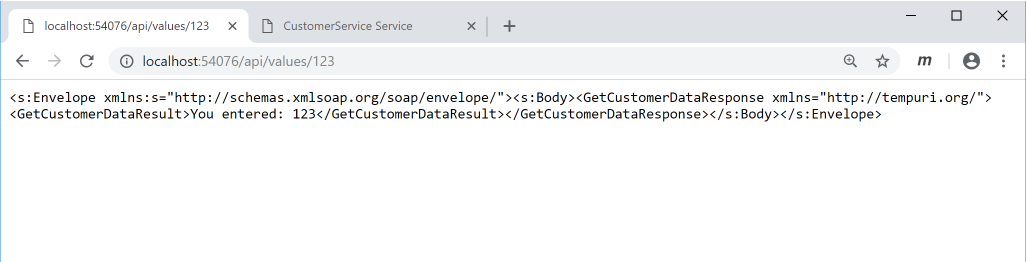
<!-- /wp:paragraph -->

<!-- wp:image {"id":661} -->
<figure class="wp-block-image"><img src="/images/image-15.png" alt="" class="wp-image-661"/><figcaption>Successful response from WCF Service</figcaption></figure>
<!-- /wp:image -->

<!-- wp:paragraph -->
<p>Have you tried to consume WCF Service from .NET Core application? How did it go for you? I would love to hear from you and would appreciate if you could suggest a&nbsp;better way of doing this as of today? I guess I don't need to tell you that I don't like using SOAP :)</p>
<!-- /wp:paragraph -->

<!-- wp:paragraph -->
<p>Cheers.</p>
<!-- /wp:paragraph -->